
Your AI Workspace. BOSS Maritime Intelligence.
AanyaX MCP connects the assistants your team uses to the maritime tools your operations depend on.
An investigation rarely begins with a neatly defined workflow. It might start with a consumption figure that looks high, a question before a fleet meeting, or a suspicion that a vessel is losing performance between cleanings.
The next step is usually to gather context. Which voyage was the vessel on? What were the operating conditions? Is the comparison fair? Before anyone can decide what the number means, someone has to bring the right evidence together.
Increasingly, that discussion begins in an AI workspace. The assistant may be good at working through the question, but it still needs a dependable way into the operational system. A pasted spreadsheet can help with one answer. It does much less for the next question about a different vessel, reporting period or voyage.
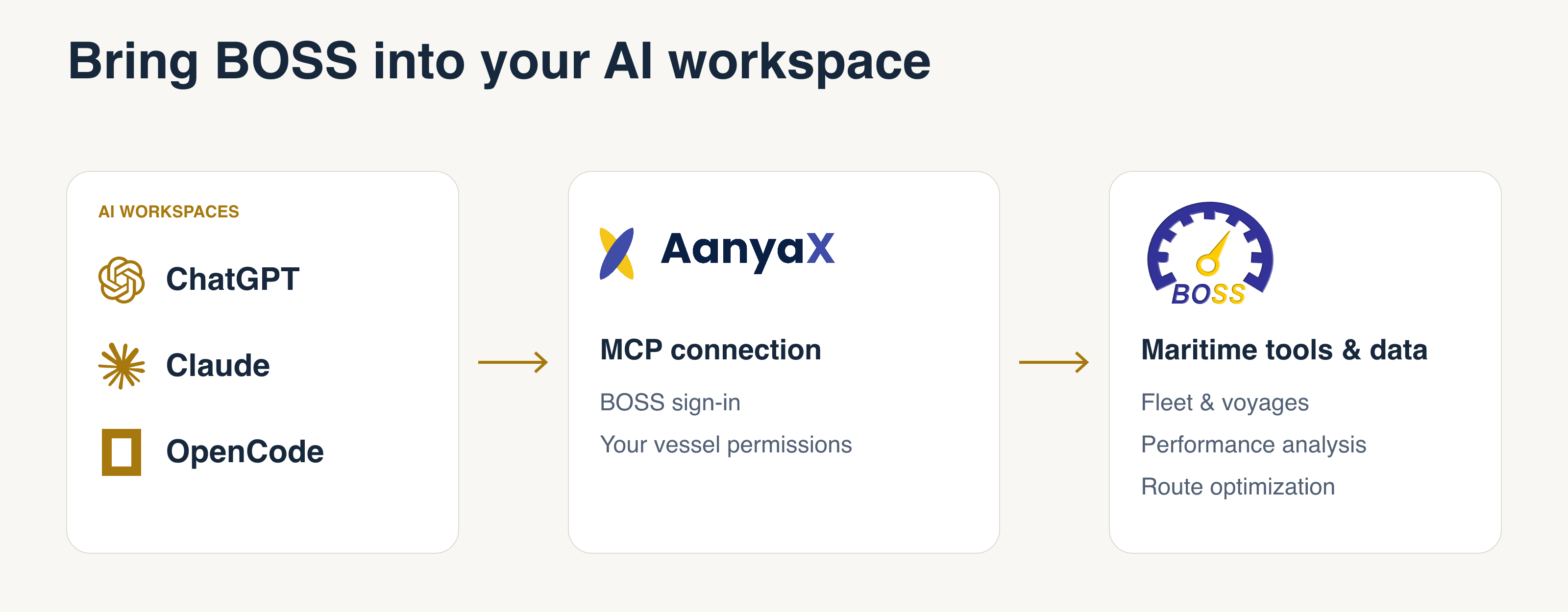
With AanyaX MCP, that conversation can reach into BOSS. A compatible assistant can request information through approved maritime tools, under the user’s existing client and vessel permissions. The workspace is where the investigation unfolds. BOSS remains the system that supplies the operational data, executes the tools and determines what the user may access.
A connection to capabilities, not just data
MCP stands for Model Context Protocol. In practical terms, it gives an AI assistant a standard way to request information or use a tool in another system.
AanyaX uses that standard to make selected BOSS capabilities available outside its own interface. The assistant can discover the available tools, choose one relevant to your question and use the response in its analysis. A follow-up question can lead to another tool request, rather than another manual export.
That distinction matters. The connection does not hand an assistant a database and ask it to reconstruct how a fleet operates. Requests go through BOSS tools for fleet status, reports, performance and routing. Their underlying logic and access checks remain in BOSS, rather than becoming instructions that each team must recreate in a prompt.
Examples of workspaces with MCP support include ChatGPT, Claude and developer-oriented tools such as OpenCode. They do not all have the same setup process or capabilities, so the connection should be checked in the workspace your organization uses.
Follow the question into the evidence
Consider a question such as:
Using AanyaX, can you tell me which vessels are performing poorly and may need hull cleaning?
Answering that usefully requires more than a list of high fuel-consumption figures. A review needs vessel context, recent operating conditions and an appropriate performance comparison.
Through the connection, an assistant can request fleet information, inspect available noon reports and monitoring data, and consult performance models or speed-consumption curves. You can then ask it to explain which vessels merit investigation, show the evidence and identify what information is missing.
The useful part is the follow-up. Was the vessel operating at a different speed? Does the concern persist across more than one report? What does the available model suggest? The team can pursue those questions in the same workspace, with the assistant requesting further BOSS information where the tools support it.
Poor performance alone does not establish that a hull needs cleaning. Weather, loading condition, speed, machinery issues and data quality can also affect the picture. The purpose is to help your team prioritize a closer review, not to turn an AI recommendation into an automatic maintenance decision.
When a summary raises another question, the investigation can go deeper. AanyaX can also retrieve submitted vessel reports and discover the fields available for a vessel, including details beyond the standard noon-report view. Larger datasets are provided as downloadable files rather than squeezed into a chat response. The assistant can work with that evidence where its workspace supports file analysis, with gaps in the source data made explicit.
From fleet context to voyage decisions
The current toolset covers three areas of fleet work:
Know the fleet
Put each vessel in its operational context.
- Fleet status
- Vessel particulars & AIS
- Voyage details
Understand performance
Explore the evidence behind a concern.
- Noon reports & submitted vessel reports
- Monitoring data
- Vessel performance models
- Speed-consumption curves
Plan the voyage
Bring BOSS routing tools into the discussion.
- Route optimizer & sea-distance queries
- Saved voyage plans
You might start with a simple question about which vessels are approaching a port, then ask for the relevant voyage details. Or you might investigate a performance concern by bringing together reports and model data in the same conversation.
For voyage planning, the connection also provides access to the BOSS Route Optimizer. A request can describe the vessel, ports, departure, operating condition and planning priorities. Sea-distance questions and full optimization are different tasks: a request for distance does not need to become a full voyage optimization. Inputs, assumptions and resulting plans should still be reviewed by the team.
Not every planning question calls for a new simulation. AanyaX can retrieve an existing saved voyage plan, bringing its schedule and available reported ETA and fuel-on-board information into the discussion. A team can ask, for example, “What does the saved plan for this voyage show, and how does it compare with the latest reported ETA?” This is a review of the information already held in BOSS, not an instruction to change or send a plan.
An investigation today, a standing workflow tomorrow
An interactive investigation and a scheduled fleet review have different needs. In the first, a person steers the questions, challenges an assumption and chooses where to look next. In the second, the work needs a saved definition, a schedule and a place to review each run.
Both have a place. MCP lets teams bring selected maritime tools into an external assistant for exploratory work. AanyaX’s native Agents provide the BOSS-managed environment for recurring workflows, with their configuration, vessel scope, scheduling and run history.
The external workspace manages its own conversation; BOSS-managed schedules and run history remain inside AanyaX. A team can use an investigation to discover what matters, then build a recurring review around those findings in AanyaX.
More ways into the same maritime foundation
The workspace may change, but the need for reliable maritime context does not. BOSS continues to enforce client and vessel access through its tools, while the connected assistant works with the information returned to it. That makes the choice of AI workspace part of each organization’s data-sharing decisions, with operational judgment remaining with the team.
AanyaX MCP gives teams more freedom in where a question begins, without asking them to rebuild the maritime capabilities behind the answer. A performance concern raised in a conversation can be explored against BOSS data. A useful investigation can inform the next fleet review. Less effort goes into moving information between systems, and more can go into understanding what it means.
Talk to Blue Water about bringing BOSS into your team’s AI workflows.
AanyaX is part of the BOSS platform by Blue Water.